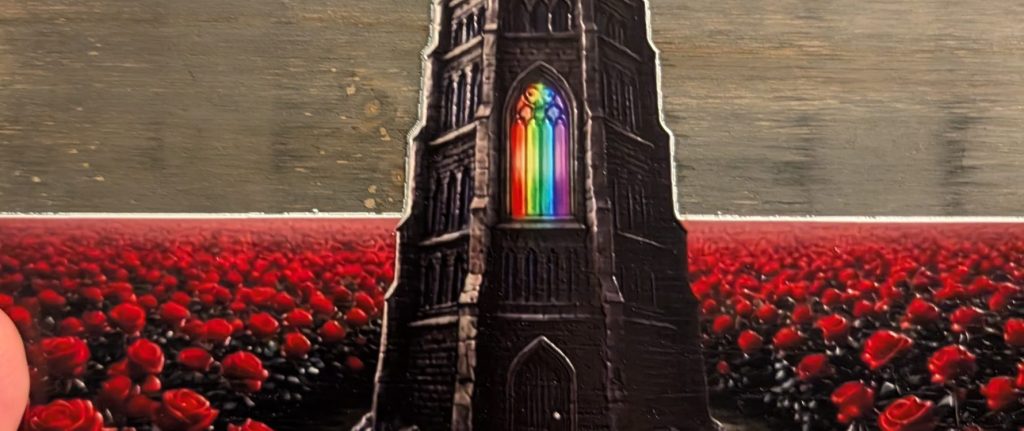

Spent most of this week in the lab trying to calibrate the large bed on the eufyMake E1. Here’s the whole stupid saga in case you’re mid-saga right now.
The symptom made no sense:
- Printer runs the calibration pattern
- Pattern comes out clean. Right position, right everything.
- Printer says calibration failed.
- Repeat. Repeat. Repeat.
Nothing in the docs. Nothing in the Facebook groups — I searched, I scrolled, I posted. Got the usual “did you power cycle it” energy and one guy telling me to check my firmware version, which was current.
So I described the whole situation to Gemini instead. Symptom, what the pattern looked like, what the machine was doing, what the room looked like. It asked about my ambient lighting.
My garage has bright LED shop lights basically directly over the bed. The calibration step has to read the pattern it just printed, and the lights were washing out what it needed to see. Printing perfectly. Reading nothing.
Turned the overheads off, ran it in dimmer light, calibrated on the first try.
What I’d tell past me:
- If the pattern prints correctly but calibration fails, stop debugging the print. Debug the read.
- Ambient light is part of your setup even though it’s not in any spec sheet or checklist.
- Forums are great at common problems and useless at your problem. Twenty minutes describing the full situation to an AI beat a day of scrolling threads.
Standard disclaimer: this is what fixed it for me in my garage. I’m not claiming to know the internals of the machine.
Couple of works in progress below, and both of them taught me something.
Print one: wood hanger, and a white line I didn’t ask for
Printed onto a wood wall hanger. The design file has a transparent background on purpose — I wanted the grain coming through behind the artwork, and that part worked exactly like I hoped.
What I didn’t expect was a thin white line tracing the edge of the artwork. Runs along the spire and across the horizon. It’s not in my file anywhere.
Took me longer than it should have to work out why. On a UV printer, white is real ink. It gets laid down underneath the color so artwork doesn’t go see-through on dark or textured material. The software reads the transparency in your file to decide where that white layer goes. It wasn’t confused by my clear background — it read it correctly and laid the white slightly wider than the color sitting on top of it. So you get a white halo everywhere the design meets nothing.
The obvious fix is to turn the white layer off, but that’s not actually what I want. Without it, the wood tone comes up through every color and the reds go flat. The whole point of this piece is saturated color against bare grain.
So two things to test instead:
- Choke the white layer. Most UV software can shrink the white slightly relative to the color so it can’t peek out past the edge. Need to find what it’s called here.
- Hard-edged file. If the outer pixels of my PNG are partially transparent instead of fully transparent, the software is probably still reading them as “put ink here.” Might fix the halo without touching a single setting.
Print two: same design, dollar store canvas, different problem
Took the same design, added a sky background this time, printed on a cheap canvas from the dollar store.
The canvas wasn’t tight. It had slack in it. Results were smearing and visible lines running through the print.
Here’s the part I didn’t think about beforehand. The print head rides a set distance above the surface. A loose canvas doesn’t hold a flat plane — it bows and flexes. So the head is very likely making contact with the material and dragging through ink that hasn’t cured. That’s the smearing. The weave texture showing through accounts for the lines.
I got a bad print. I could just as easily have damaged the print head, which is the expensive part of the machine. Not doing that again.
Two things filed under stuff nobody tells you:
- Transparency in your file isn’t neutral. It’s an instruction, and the machine follows it further than you meant.
- Substrate flatness isn’t a quality-of-finish concern, it’s a clearance concern. Cheap material is fine. Loose material is not.
If you’ve already solved either of these on an E1, tell me and save me the trouble.