The Goal
I needed a way to test a short-form video idea for my demotivational speaker alter-ego, Desmond Vance, without sitting in front of a camera every time I had a thought.
The plan was simple:
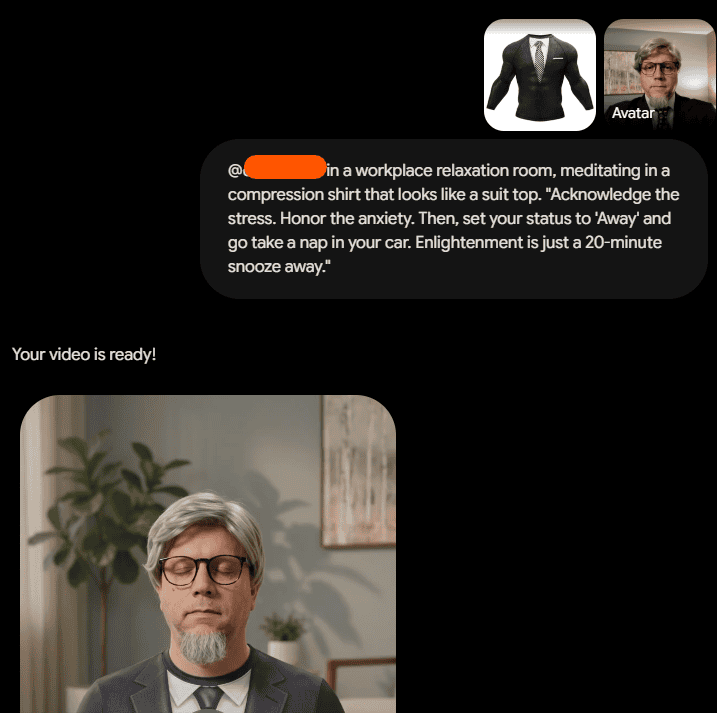
- Train a custom avatar in Gemini that matches Desmond’s look and voice.
- Generate short 10-second clips on demand.
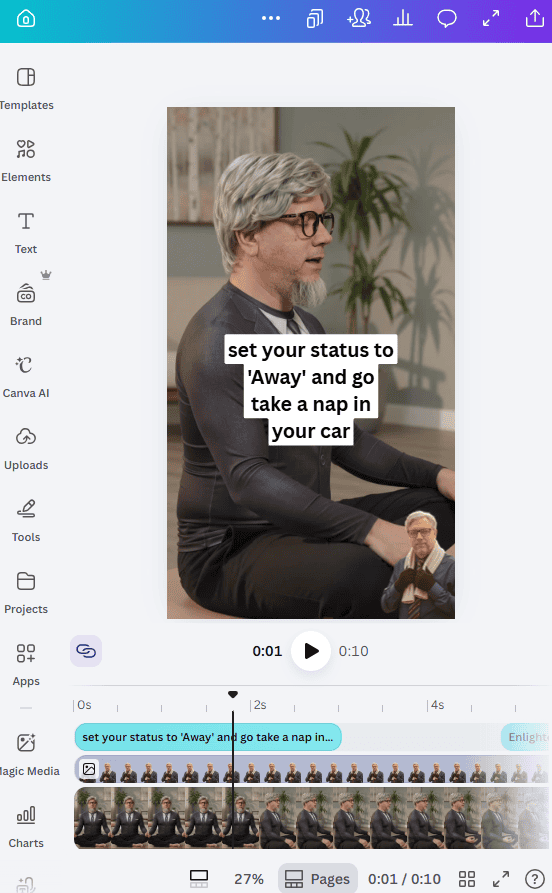
- Drop the MP4s into Canva to add text overlays.
- Slap a badge over the Gemini watermark in the corner.
I wanted a zero-friction pipeline. I wanted to go from an idea in my head to a published TikTok in five minutes flat.
The Toolkit
- Gemini (Custom Avatars): Clones the look and voice from a source calibration video and generates new 10-second clips.
- Canva: Handles the vertical 9:16 layout, text formatting, and graphic overlays.
- TikTok: The destination for publishing and watching the numbers.
Here is how we set up the assembly line:
The Strategy / The Build
- Training the custom avatar
- I dressed up as Desmond Vance:
- Cheap wig
- Reading glasses
- Ugly tie
- Dress shirt and suit jacket
- I ran through Gemini’s avatar creation process.
- I recorded the setup video directly in the tool, moving my head side to side and reading out the prompt numbers on screen so it could lock down my facial geometry and voice tone.
- I dressed up as Desmond Vance:
- Generating the clips
- Once the avatar was ready, Gemini had Desmond’s look and voice saved.
- I started generating 10-second clips by giving it simple visual actions:
- Staring blankly at a desk
- Looking unimpressed in an office
- Walking through an empty hallway
- Polishing in Canva
- I downloaded the raw 10-second MP4 and dropped it into a blank 9:16 vertical Canva canvas.
- I set the video as the background.
- I created a circular headshot badge and positioned it in the bottom corner right over the Gemini watermark.
- I added bold, centered text across the top with Desmond’s quotes (“Master the Minimum,” “Lower Your Expectations”).
The Roadblocks
- Viewer distraction from the watermark
- Big tool watermarks in the corner pull eyes away from the clip. I’m not trying to hide that it’s AI—hence writing a whole post about it—I just don’t want people tuning out or getting disconnected from the joke because a software logo is flashing in the corner.
- The Fix: I made the circular headshot badge in Canva slightly larger than necessary so it comfortably covers the entire corner, keeping the viewer’s focus on Desmond and the punchline.
The Finished Project
The pipeline works. I went from dressing up once in front of my webcam to pumping out multiple TikTok clips without putting the suit back on.
You can see the final Desmond Vance videos live on TikTok:
The Verdict:
I no longer have to set up lights or hit record for every new clip.
I no longer have to open a real video editor just to add text to a 10-second video.
I no longer want to pull my hair out over video production.
Once the template is saved in Canva, shipping a new clip takes under five minutes.